
Google Search Console has traditionally focused on websites, allowing users to monitor search performance and SEO health through metrics such as clicks, impressions and search position. If someone headed to your Instagram or YouTube from Google’s search results, the analytics about those clicks would simply disappear into the ether.
That’s what makes Google’s introduction of Platform Properties rather exciting. It’s Google signalling that the search landscape has truly changed, and is giving us a wider view of how brand awareness is actually working. And that maybe it’s time to put some SEO-led copy into our social posts…
Google Search Console is a free SEO tool provided by Google that allows website owners, SEOs, marketers and developers to monitor how their site performs in Google Search.
This includes valuable analytics on the search queries that brought people to your website, how web pages are indexed, whether Google can crawl your site and if there’s any technical issues that could be affecting your search performance.
Traditionally, that has meant looking at your website. Platform Properties extend that visibility to a handful of supported third-party platforms, providing you with another way to understand how you’re being discovered through Google.
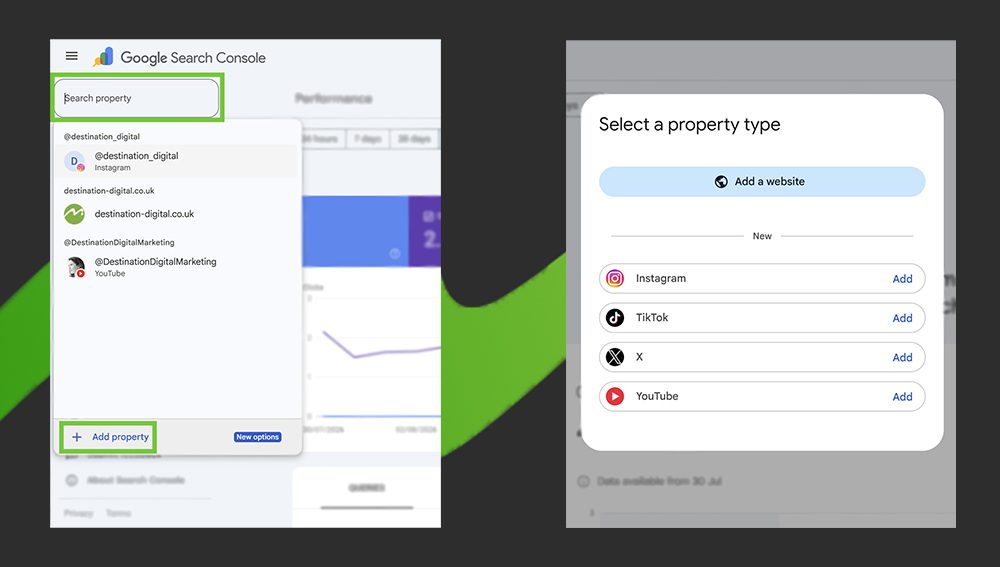
A Platform Property allows you to connect supported social media platforms to Google Search Console and understand how your content performs in Google Search. At the moment, supported platforms include Instagram, TikTok, X and YouTube.
Once connected, you can access reports on how your content performs across all platforms on Google Search, as well as News and Discover. This could help you to identify the moment a particular social post starts gaining visibility on Google, what people are searching for before discovering your content and which topics are attracting attention, helping you to further refine your content strategy.
Once you’ve connected a supported platform, there are several reports and features worth exploring.
The Insights report provides data on the search terms that people are using before discovering your content through Google Search – giving you access to the top queries and what’s trending up and trending down.
This can help you spot patterns in what your audience is searching for and identify topics that could inspire your next video, social post or piece of content. Instead of guessing what your audience wants to see next, you can use search data to give you a few clues!
The 24-hour filter can be particularly useful when you’re keeping an eye on new or trending content, helping you to identify whether a specific search term is suddenly bringing people to your content. This could be especially useful when you’ve just published a new video or social post and want to understand how people are finding it through Google.
You might discover that a topic you didn’t expect to perform well is suddenly attracting search visibility, providing you with an opportunity to create a follow-up piece of content, repurpose the topic for another platform or give the original post a little extra promotion.
If you’re managing multiple platforms, exporting your performance data can help you bring everything together for comparison. Rather than looking at YouTube, Instagram, X and TikTok in isolation, you can analyse their Search Console data side-by-side and look for broader patterns.
This will help you to further understand the nuances between each platform’s audience and optimise your content.
Sometimes, your newest content isn’t your most valuable. Search Console can help you to identify older videos or posts that are continuing to attract visibility through Google, or content that’s suddenly started to gain traction again.
That could give you an opportunity to revisit them and consider pinning them to the top of your feed, covering the topic on other platforms or re-hashing the content whilst there’s renewed interest.
You can also use Search Console’s filtering and comparison features to investigate how different types of content perform. For example, you could compare how short-form content performs against full-length videos on YouTube.
Use comparison mode to create groups based on URL patterns and identify which types of content are attracting the most visibility from Google. You can do this by clicking “+ Add filter” at the top of your performance report, “post” and then “compare”.
Ready to have a look for yourself? Setting up a Platform Property is relatively straightforward.
Don’t panic if you don’t immediately see a wealth of information. Google says it can take a few days for data to appear in the reports, so give it a little time before deciding that nothing is happening.
If your business is investing time and money into social media or video content, we’d say it’s certainly worth taking a look.
Platform Properties aren’t going to replace your existing social analytics, and they don’t suddenly turn every Instagram post into an SEO asset, but what they do give you is another view of your content’s performance, specifically, what people are searching for, which content is being discovered and where there might be opportunities to do more with the content you already have.
This is becoming increasingly more important, as the search landscape has changed rapidly over recent years. Google Search is increasingly being shaped by AI-powered summaries, video, Discover and content from sources beyond traditional websites. At the same time, people are using social platforms as search engines in their own right, looking for recommendations, products, reviews and answers directly within platforms such as TikTok and Instagram.
That means measuring digital performance solely through website traffic can give you an incomplete picture of what’s really going on.
Your audience isn’t necessarily following a neat journey from Google to your website anymore. They might discover your brand through a TikTok video, search for you on Google, watch a YouTube video, find an Instagram post and eventually visit your website – all as part of the same customer journey.
Platform Properties won’t tell you the whole story, but they can help fill in another piece of the puzzle.
And if you’re already investing time in creating social and video content, understanding how Google contributes to its reach could help you make better decisions about what to create, what to repurpose and where to invest your time next.
If you’d like help with digital marketing strategy, ads management, social media management or any other aspect of digital marketing, please email us on info@destination-digital.co.uk or give us a call on 01629 810199.
If you’d like help with digital marketing, ads management, SEO, copywriting, websites, branding or social media management… or anything else related to the internet and digital, then get in touch with us. We’re a friendly bunch.
You can email us on info@destination-digital.co.uk or give us a call on 01629 810199 or you can use the contact form at the bottom of this page.