
We unfortunately ran into this issue with a client for whom we currently look after over 100 business locations. It affected collecting our end of month KPIs on several listings, as without access to the management dashboard we were unable to click into the Performance section in order to grab those numbers. It was pretty frustrating as some of these listings were some of our client’s high performers, so being unable to input that data was skewing our KPI tracking and not painting a full picture of our client’s Google Business Profile performance for many months.
How the Google management dashboard should have been appearing in each listing:
The view we were getting, despite still being managers on the business listings that had been affected by the Google glitch:
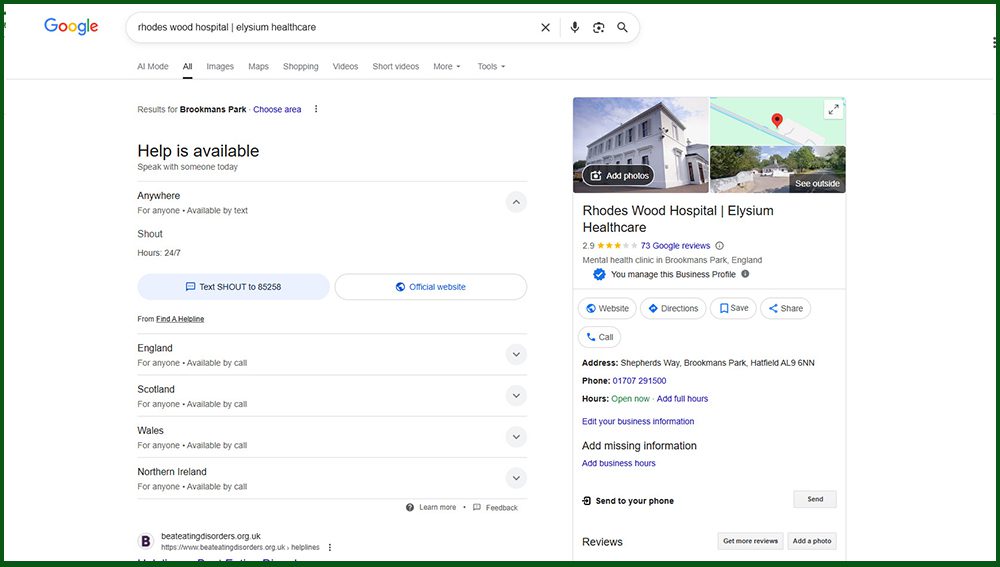
However, the silver lining when we encountered this problem was that we found a way around it in case it ever happens again. While it might not be as convenient as being able to access the full performance metrics via the dashboard, it was definitely something we could work with while we waited for the Google Business Profile Management Dashboard glitch to pass. So, we thought ‘sharing is caring’ and that we’d pass on the tip just in case anybody finds themselves in the same position now, or in the future.
You can still access a version of the performance metrics for a listing (or multiple listings) from the Businesses section of your Google Business Profile Manager account by following these steps:
The GMB insights and performance report spreadsheet you’ve downloaded will include data for the number of:
And there you have it! It’s an incredibly simple workaround for when you can’t access a business location’s performance metrics via the usual Google Business Profile Management Dashboard, but it’s not an immediately obvious option when you’re struggling to access your insights – especially when it’s a random glitch that is nonsensically targeting some of your business listings but not others. Hopefully, if you’ve read this far, you’ve found this helpful and now you can pass this to other business owners and digital marketers in their time of need.
If you’d like to talk to us about this news piece, or you’d like help with digital marketing strategy, content marketing, SEO or anything else digital, please email us on info@destination-digital.co.uk or give us a call on 01629 810199.
If you’d like help with digital marketing, ads management, SEO, copywriting, websites, branding or social media management… or anything else related to the internet and digital, then get in touch with us. We’re a friendly bunch.
You can email us on info@destination-digital.co.uk or give us a call on 01629 810199 or you can use the contact form at the bottom of this page.